
See Your Organisation Through An Attacker’s Eyes
Your security team can only respond to the threats it knows about.
Run a complimentary Infoblox External Threat Scan to uncover those outside-in signals, then our security specialists will talk you through what we’ve found, where the risks sit and what you can do next.
Request Your Free External Threat Scan
Quick. Non-invasive. No deployment required.
"*" indicates required fields
The threat isn’t always inside your network
Your digital footprint extends far beyond the infrastructure your security team directly controls.
Domains. Cloud services. Social platforms. Ad networks. App stores. Third-party sites. Underground forums.
Attackers operate across all of them – and AI is making it faster and easier to launch convincing impersonation and phishing campaigns, then reappear under new domains and accounts when they’re discovered. Infoblox highlights this fragmentation as one of the reasons external abuse can be difficult for organisations to identify and contain.
The Infoblox External Threat Scan gives you an outside-in view of your organisation, helping uncover the signals your existing security controls may not see.
What could already be happening outside your perimeter?
The scan looks across three key areas of external risk:
Brand Compromise
Uncover threats associated with your brand, including potential impersonation, phishing sites and leaked credentials.
Brand Targeted Activities
Understand where attackers may be targeting your organisation across web, social and underground sources.
External
Risk
Identify high-level risks across your external attack surface, including potential open ports, CVEs and expiring certificates.
What we’ll look for…
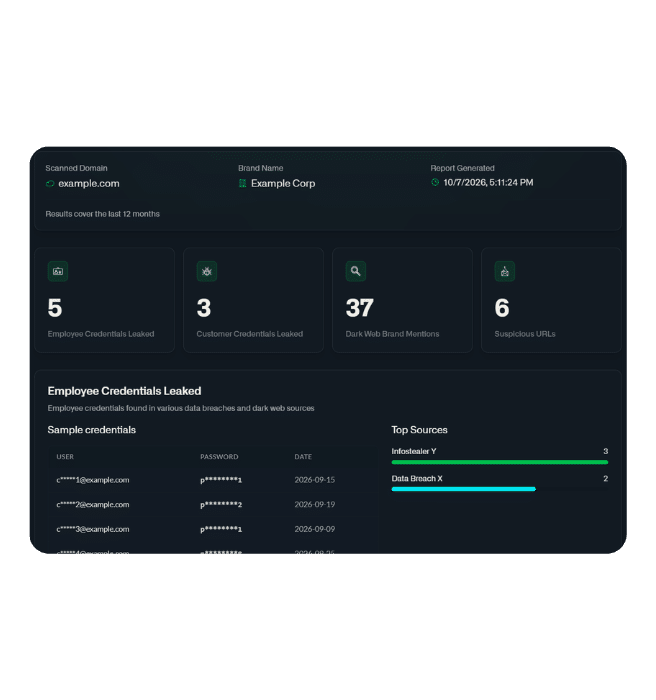
Your scan analyses external signals from the preceding 12 months, helping uncover:
Leaked credentials
Identify credential exposure associated with your organisation.
Deep & dark web mentions
See where your organisation or brand has appeared across monitored underground sources.
Suspicious URLs
Identify potentially suspicious URLs associated with your organisation.
Lookalike domains
Uncover domains that could be used to imitate your organisation or deceive customers and employees.
External digital risk
Surface high-level exposures across your external attack surface.
Don’t just get a report. Understand what it means.
The technology can uncover the signals. Vizst helps you understand what to do with them.
We’ll run the External Threat Scan on your behalf and review the findings before taking you through the results with one of our security specialists. We’ll help you understand what’s been found, where the greatest risks sit and what you should prioritise next.
Where further action is needed, this can include prioritised recommendations, guidance around containment and takedown, support across security, fraud, legal and brand teams, and direction for ongoing monitoring and risk reduction. You won’t just receive a report. You’ll have an expert there to make sense of it.
HOW IT WORKS:
01.
REQUEST YOUR SCAN.
Complete the form on this page to request your Threat Scan.
02.
WE RUN THE ANALYSIS.
Using the Infoblox External Threat Scan, we’ll assess brand abuse, credential exposure and digital risk signals across the external channels attackers use.
03.
GET YOUR ACTION PLAN.
Our team will review the results, identify key risk areas and present an action plan with practical next steps for you and your team.
See Your External Risk. Know What To Do Next.
Vizst & Infoblox help you turn outside-in threat intelligence into clear, actionable security priorities. Infoblox provides the outside-in intelligence. Vizst provides the expertise to turn those findings into action.

Discover Your Exposure
See your organisation from an attacker’s perspective and uncover externally visible assets, vulnerabilities and potential areas of risk.

Identify Your Threats
Use Infoblox threat intelligence to understand the external threats targeting your organisation, brand and digital footprint.

Understand Your Risk
Go beyond a raw scan. Vizst security specialists help you understand what the findings mean, what matters most and where action is needed.

Strengthen Your Defences
Turn intelligence into action with practical recommendations to reduce exposure, strengthen your security posture and address priority risks.

What could attackers already know about your organisation?
Request your External Threat Scan
"*" indicates required fields